
Guest guide · SharingKiosk

How to Get Your Event Photos with SharingKiosk

Find your photos, print them and save them to your phone.

At Snaply.sg events, guests collect their photos at our SharingKiosk. This short guide shows guests how to find their photos, collect prints and download the digital copies by QR code. It is complimentary with our roving photography and photo booth packages.

Send your date, venue, hours and guest count to hello@snaply.sg or WhatsApp us.

At the kiosk
  • Find your photos on the screen
  • Tap to select your favourites
  • Collect your print at the station
  • Scan the QR code to download
  • Save and share from your phone
Find your photosCollect printsScan the QR codeSave to your phoneComplimentary

Past clients include


  • LinkedIn logo
  • Apple logo
  • HarbourVest logo
  • Fendi Casa logo
  • Marina Bay Sands logo
  • Dior logo
  • NTU Singapore logo
  • Pasir Ris Secondary School logo
  • Mediacorp logo
  • Anywheel logo
  • DBS Bank logo
  • OCBC Bank logo
  • UOB logo
  • NUS (National University of Singapore) logo
  • ActiveSG logo
  • Adventurers Singapore logo
  • Sierra logo
  • INVNT logo
  • AMP Singapore logo
  • Blueprints Events Management Service logo
  • Hai Sing Catholic School logo
  • BHP logo

Quick answer

What Is SharingKiosk?

SharingKiosk is Snaply.sg’s on-site photo sharing station. Guests browse the photos taken at the event, collect their prints and scan a QR code to download the digital copies to their phone, without waiting for a gallery link after the event.

Used with our roving photography and photo booth rental.

See how it works on the day

1Our photographer captures guests
2Guests find their photo on the SharingKiosk
3Prints come out on the spot
4Guests take home their print

Step by Step: How to Get Your Photos

  1. Get your photo taken. Our photographer or photo booth takes your picture. You do not need to do anything else.
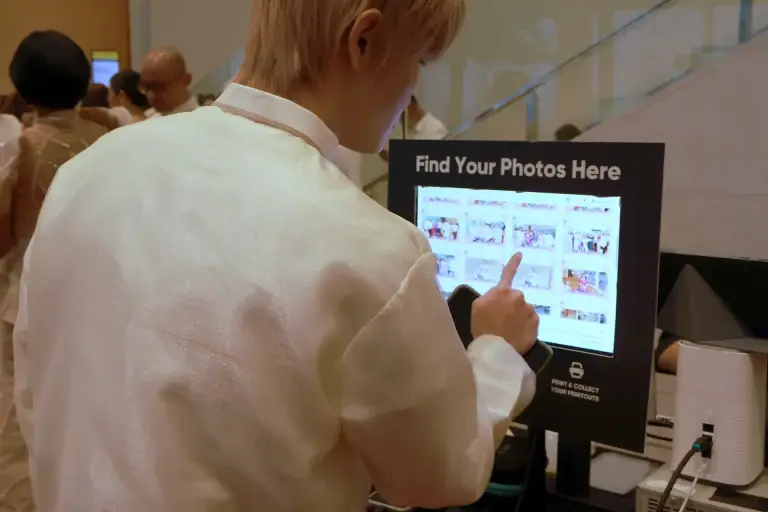
  2. Walk to the SharingKiosk. Look for the screen that says “Find Your Photos Here”, usually next to the print station.
  3. Look for your photo. Photos appear on SharingKiosk after upload, ready for guests to select and download. Timing depends on the connection and event setup. The newest photos show first.
  4. Tap your photo. Swipe or scroll to find it, then tap it to open it bigger.
  5. Collect your print. Photos are printed on-site during the event. Collection time depends on print size, copy requests and demand. Our printing assistant hands it to you with the event design.
  6. Scan the QR code. Open your phone camera, point it at the QR code on the screen and tap the link that pops up. No app needed.
  7. Save your photo. On iPhone, press and hold the photo, then tap Save to Photos. On Android, tap the download button or press and hold, then Download image.
  8. Share it. Post it, send it to friends or keep it as a memory.
Guest finding his photos on the SharingKiosk screen at a Singapore event
Guest scanning the SharingKiosk QR code to download her event photos

Having Trouble? Quick Fixes

  • Can’t find your photo? It may still be uploading. Check again shortly, or ask our assistant to search for you.
  • QR code not scanning? Move your phone a little further away and hold it steady, or turn up your screen brightness.
  • Link not opening? Check that you have mobile data or Wi-Fi, then scan again.
  • Photo not saving? Allow your browser to access Photos when asked, then try pressing and holding the image again.
  • Need a reprint? Ask our printing assistant at the station.

SharingKiosk Queue, Table and Guest Numbers

At some events, SharingKiosk gives you a number to make finding and collecting your photos even faster. Your host decides which of these are switched on.

  • Queue number. After you send a photo to print, a big number such as Q001 appears on the screen. Watch the printer display beside the print station: when your number shows under ready to collect, your print is waiting for you.
  • Table number. You may be asked to pick your table when you print. To see every photo taken at your table, type your table number, for example 12, into the SharingKiosk search.
  • Guest number. If you were given a guest number such as S0427, type it into SharingKiosk or let our team scan your QR code. Your own photos and videos open straight away.

Not sure which number you have? Ask our crew at the SharingKiosk and we will help you find your photos.

Find Your Photos with a Selfie

At events where your host has switched it on, tap Find My Photos on the SharingKiosk and take a quick selfie. The kiosk shows every photo you appear in, so you do not need to scroll through the whole event.

  • With family or friends? Take one selfie together. Each face appears as a small round picture so you can see who was found, then choose Just me, Any of us or All of us together.
  • Dim room? The kiosk brightens your selfie automatically, so it still works at night events and in darker ballrooms.
  • Your privacy. Your selfie stays on the kiosk and is never uploaded. It is only used for your search.

For the best result, face the light, look at the camera and take off sunglasses.

What Our Clients Say on Google

5.0
Based on 31 Google reviews
Jonathan Lim
Had a great experience with Snaply.sg! Prints were sharp, vibrant, true to colour. Prices were amongst the most competitive for the quality…
Read the full Google review
Yushun Hong
Jerald was absolutely helpful for my purchase and he delivered what he promised! Absolutely smooth transaction, will deal with again in future!
Charmaine Toh
Good Service 👍 Staff was friendly and would help assist with guiding on how to pose! Props were up to trend and appropriate. Highly recommended ☺️
Mervin Ong
Excellent service provided by the event company. Hire them to set up a booth and some basic photography/videography for a small event. Photo qualities were up to standard and the almost instant mini prints were a plus point. Definitely recommend!!
Wong Yi Ting
Snaply.sg was absolutely amazing! Jerald was incredibly friendly and super fast with all his replies. The photos were delivered so quickly and the quality is outstanding. Highly recommend!
C X
Jerald and his team were friendly, supportive, and professional throughout the session. They provided plenty of props, which made the experience even more fun and…
Read the full Google review
Chewy Bear
Thank you for the fast service and affordable prints. The photos printed are high quality and crisp 🙂 Fuss free and delivery was next day!
Jolena Tan
Prints were clear & sharp!!! I’m very satisfied with them. Process of getting them was fuss-free & quick as well. Thank you Jerald & Snaply.sg team! 😊
Jam Mie
Excellent experience from start to finish! The staff were friendly, helpful, and professional. Everything was handled efficiently and exceeded my expectations…
Read the full Google review
Rejectance
Good Service, Very Detail with what they offer and make options that are very comfortable with Photography needs
Isaac See
He has been very helpful and has a positive attitude. Reliable and value for money
aqilah busyra
everything was swift, the entire process was smooth & super helpful. photos came out wonderful. thank you
Kapil T
His print quality is too good. Also thanking him for providing the service timely. Last time he was able to print my adhoc request as well. Thanks.
Miguel Coronel
Very good service, goes above and beyond for their customers
Xiangjing Ng
Super good seller, highly efficient in his service. Pls support him! Good attitude and good service!
Seng Wee Wong
The seller is very communicative and had delivered the promise of shipping out the photos asap. Glad to see that the photos are of great quality as well.
Quick tips

SharingKiosk Tips for a Smooth Photo Download

The SharingKiosk is designed so any guest can find and save their photos in under a minute. These quick tips make it even easier on the day.

  • Look for your photo on the SharingKiosk screen. New photos appear on the SharingKiosk shortly after they are taken, with the most recent at the top. Scroll or tap through the gallery to find yours.
  • Pick more than one. You can select several photos at once on the SharingKiosk and send them together, so there is no need to queue twice.
  • Choose how to receive them. Scan the QR code to save straight to your phone, or enter your email or Telegram to receive them there. Your details are only used to send your photos.
  • Check your spam folder. If an email from the SharingKiosk has not arrived after a few minutes, it may be in your junk or promotions folder.
  • Ask our team. Our on-site team stands near the SharingKiosk throughout the event and is happy to help you find a photo or resend it.
After the event

Finding Your Photos After You Leave

Missed the SharingKiosk on the day, or want to download your photos again later? Ask the event organiser for the gallery link or QR code shared after the event. The same SharingKiosk gallery opens on your phone or laptop, and you can search, select and save your photos the same way you did at the event.

For the best quality, save the original file rather than taking a screenshot. Photos you save from the SharingKiosk keep the event overlay chosen by your host, so they are ready to post or print. If you need a photo removed from the gallery, let the organiser know and we will take care of it promptly.

Frequently Asked Questions

No. Guests scan the QR code with their phone camera and download the photo in their browser.

No. SharingKiosk is complimentary with our roving photography and photo booth packages.

Our on-site assistant can help them search. Organisers also receive the full set of event photos after the event.

Yes. All photos are delivered to the organiser after the event.

Yes. The QR code links straight to your selected photo on Snaply.sg’s sharing page. You do not need to log in or share personal details.

Organisers receive all event photos after the event and may share a link with guests. Ask your event organiser.

Yes. Any phone camera that can scan QR codes works, and photos open in your normal browser.

Photos appear on SharingKiosk after upload, ready for guests to select and download. Timing depends on the connection and event setup. Photos are printed on-site during your booked service hours. Collection time depends on print size, copy requests and demand.

No. The SharingKiosk works in your phone browser. Scan the QR code, choose your photos and save them, with nothing to download or install.

Your queue number tells you when your print is ready: look for it on the printer display beside the print station. A guest number, such as S0427, lets you type it into SharingKiosk to open all your own photos and videos at once. Not every event uses these numbers, so ask our crew if you are unsure.

Yes, at events where your host has switched it on. Tap Find My Photos on the SharingKiosk and take a selfie, and the kiosk shows every photo you are in. With family or friends, take one selfie together and choose just me, any of us, or all of us together. Your selfie stays on the kiosk and is never uploaded.

For event companies and venues

Use SharingKiosk for Your Own Events

SharingKiosk is also available for event companies, photographers and venues who want instant photo sharing at their own events.

  • Try it or subscribe: message us to arrange a demo or subscribe to SharingKiosk for your events.
  • Customise it: get a SharingKiosk with your own branding, screens and guest flow, built around your event.
  • Engage us for your event: let our team run SharingKiosk alongside your roving photography or photo booth.

Make Photo Sharing Effortless at Your Event

Tell us about your event and we will set up SharingKiosk alongside your roving photography or photo booth.